DRIFT
← All features
Areas

Somewhere for everything to land

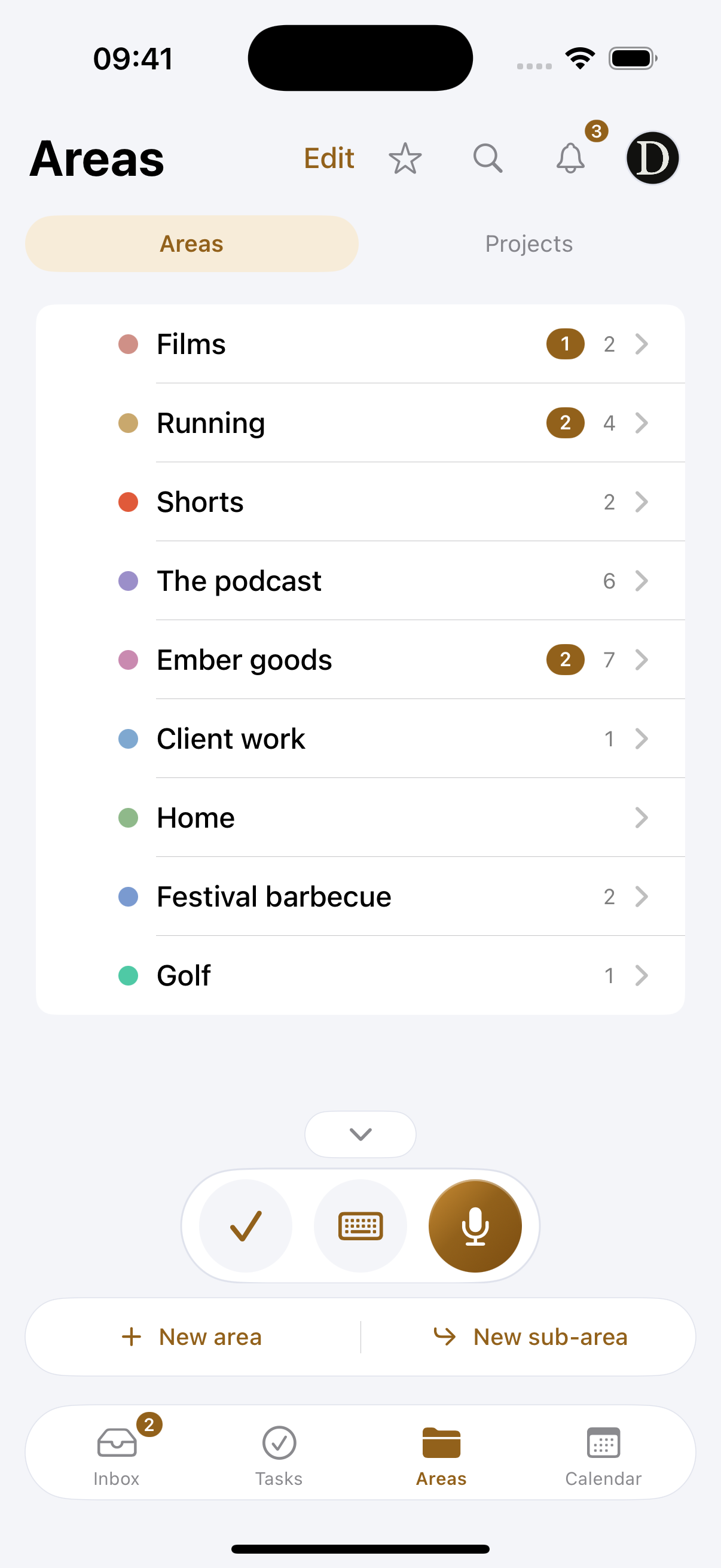
An idea with nowhere to go is an idea you lose. Areas are the handful of things you are actually making: the channel, the podcast, the shop, the client, the house. Everything Drift catches lands in one of them, and that is the whole filing system.

Plan
Free · up to 4 areas, unlimited on Pro
Works on
iPhone, iPad, Mac and Apple Watch
Find it in
The Areas tab, and the sidebar on a Mac
Youtube5
Shorts1
The podcast3
Ember goods2
Client work4
Retainer2
Home4
Areas are the shelves. A sub-area is for a part big enough to deserve its own.
What you can do
Keep one per side of what you do
Not folders inside folders. Five or six areas that match the real parts of your life, so a spoken idea has an obvious home.
Give each one a colour
The colour follows it everywhere: on cards, in the calendar, in search. You learn to read the list without reading the words.
Split one when it earns it
A sub-area for a part big enough to deserve its own shelf. Shorts under Youtube, one retainer under Client work.
See what is inside at a glance. Projects, ideas and tasks for that area in one place, with the tasks that belong to it but to no project still showing up.
Add straight into one. Open an area and put an idea, a project or a task directly in it, without going back to the inbox.
Share one, not everything. Areas are the unit of sharing too, so an editor sees the channel and nothing else.
How it works
01
Set them up once
Onboarding asks what you are working on and suggests the areas from your own description. Two minutes, and you rarely touch them again.
02
Capture without choosing
You speak. Drift reads what you said and suggests which area it belongs to, so filing is a confirmation rather than a decision.
03
Let them grow
When one area starts holding two different things, split it. The ideas inside move with it.
Why it works this way

Few, on purpose

Every app that lets you nest folders forever ends up with a filing system nobody can hold in their head, and an inbox nobody empties because deciding where a thing goes is harder than leaving it. A short list of areas is the constraint that makes one-tap filing possible: Drift can suggest well because there are only ever a few right answers.

The colour is the interface

Once an area has a colour, you stop reading names. A red dot in the calendar is the channel, a purple one is the podcast. It is the fastest way to know what a week is made of, and it costs nothing to learn.

Four on free, and why

Four areas is enough for the way most people actually work, and it is enough to see whether Drift suits you. Pro removes the limit for the ones running more than that.

Common questions
What if I do not know my areas yet?
Describe what you are working on out loud during setup and Drift suggests them. You can rename, recolour or delete any of them afterwards.
Can an idea belong to two areas?
No, and that is deliberate. One home per idea is what makes finding it later reliable. Use a sub-area if something genuinely straddles two things.
What happens to the ideas if I delete an area?
They are not deleted with it. They go back to being unsorted so you can put them somewhere else.
Pairs with
Try it with your own ideas
Free to start, no credit card. Set up your areas in two minutes.