DRIFT
← All features
Suggested sorting

Drift suggests. You decide.

Filing is where good ideas go to die. Drift removes the filing without removing your control: every capture arrives with the right area already suggested, and one tap confirms it.

Plan
Pro
Works on
Everywhere you use Drift
Find it in
The suggestion bar in your inbox
Fresh capture
Numbered founder’s edition tee
business
✦ Drift suggests My brand
Suggestions come from how you describe each area, “my apparel brand”, “my filmmaking channel”.
What you can do
Describe your world once
“My apparel brand”, “my filmmaking channel”. Those descriptions are what new ideas get matched against, so write them like you would explain them to a new assistant.
Capture without deciding
At capture time you make zero filing decisions. That is what keeps capture fast enough to actually happen.
Keep or move, one tap
Each idea arrives with a suggested area and a Keep / Move bar. Confirm it, or send it somewhere else.
Get a headline and a type. Video, business, marketing, question. The title reads like something you would have written yourself.
Hear the timing in what you said. “Friday at three” becomes a date on the idea, not a detail you have to re-enter.
Leave it unsorted. When nothing clearly fits, nothing is forced. The idea waits in the inbox rather than landing somewhere random.
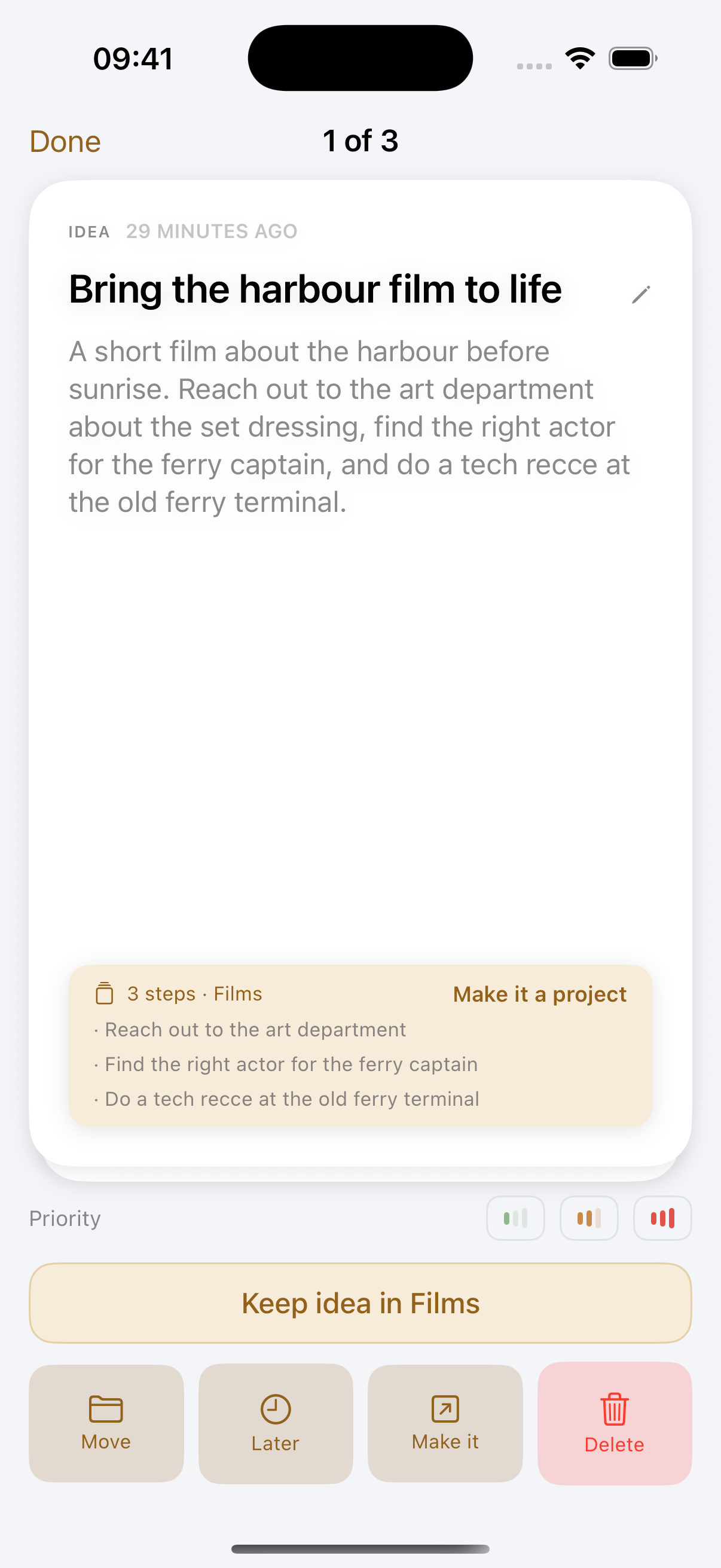
Swipe through them like a deck. Sorting is dealt one at a time, and you swipe: keep it, come back to it later, or let it go. It is the part of Drift people actually enjoy.
Undo for fifteen minutes. Everything you file leaves a trail you can undo from the inbox, so a wrong swipe costs nothing and you can move quickly.
Make it real from the deck. Turn one into a task or a project while you are sorting, without opening it.
Fix a wrong headline on the spot. Noticing a bad title while sorting used to mean filing it anyway and finding it again later. Edit it in the deck and carry on.
It brings back what went quiet. An idea you filed and never touched comes back to you after a while, batched into one message rather than nagging.
A summary once a week. One note that says what is waiting and what has gone cold, so nothing rots at the bottom of a list.
How it works
01
Teach it your world
Your areas mirror what you actually work on. The description is what Drift matches against, write it like you’d explain it to a new assistant.
02
Capture without deciding
At capture time you make zero filing decisions. That keeps capture fast enough to actually happen.
03
Confirm in the inbox
Each idea shows its suggested home. Keep it, move it, or leave it unsorted, the inbox empties either way.
Why it works this way

Why suggestion beats automation

Fully automatic filing sounds great until it files something wrong and you stop trusting the system. The Keep/Move bar keeps you in the loop at the cost of exactly one tap, trust stays intact, and the inbox still reaches zero in minutes.

It learns from where you put things

Your area descriptions and personalization notes are the map, and your own recent filings are the corrections to it: file a few captures under Client work yourself and the next similar one is pointed there. Nothing is inferred behind your back, it reads what you wrote and where you filed.

Unsorted is allowed

When nothing clearly fits, Drift doesn’t force it, the idea simply stays in your inbox as unsorted instead of landing somewhere random.

Common questions
What does the free plan do instead?
Captures are saved and transcribed and you file them yourself. The suggested area, the headline and the date reading are the Pro part.
Does it learn from my corrections?
Yes, from your own filings. The captures you have recently placed yourself are read back as examples, so where you actually put things starts to outweigh where the descriptions alone would point. Sharpening an area’s description helps too.
What if it suggests the wrong area?
You always see the suggestion before it sticks. Tap Move and pick another, or leave it unsorted and decide later.
Pairs with
Try it with your own ideas
Free to start, no credit card. Set up your areas in two minutes.