DRIFT
← All features
Voice capture

Speak, don’t type

Every system for ideas dies at the same moment: capture. Drift is built so the distance between “idea” and “saved” is one tap and a sentence, or no taps at all.

Plan
Free · unlimited on Pro
Works on
iPhone, iPad, Mac, browser
Find it in
The mic button, from anywhere
Tap to talk
“Hey Siri, catch my drift”
works from the car, a walk, the shower doorway
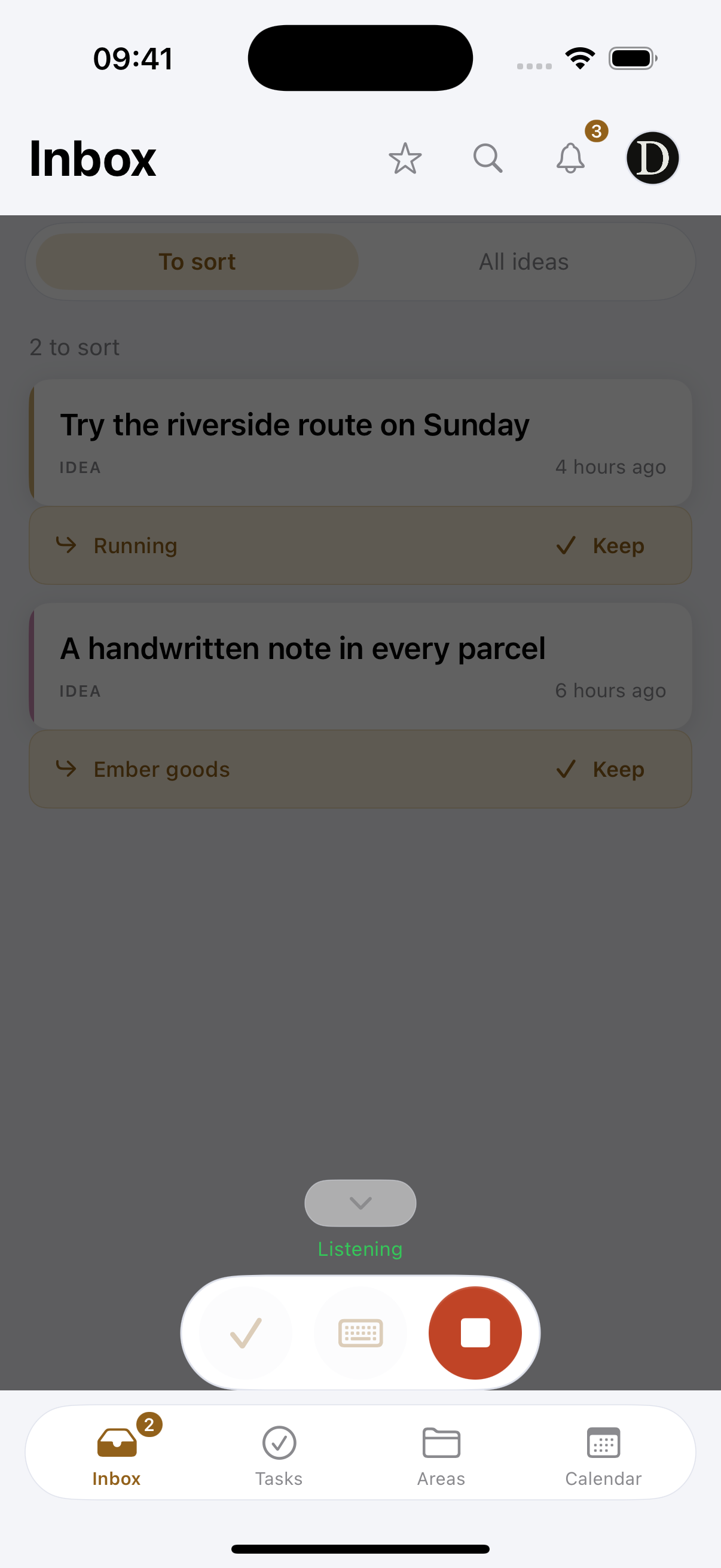
A reference mock-up, in the app, capture opens full-screen with live transcription.
What you can do
Talk, don’t type
One tap opens the recorder. Ramble, double back, think out loud. It keeps listening until you tap stop, so a pause never cuts you off.
Go fully hands-free
“Hey Siri, catch my drift” works from the lock screen. On iPhone and iPad the capture runs in the background without opening the app.
Type when talking is awkward
On a train, in a meeting. The typed thought goes through exactly the same pipeline as a spoken one.
Catch them back to back. Every capture becomes its own idea, so one walk can produce six of them without any of them merging.
Keep nothing you didn’t mean to. Audio is transcribed and discarded on the spot. What is stored is your words, in your account, deletable any time.
It works with no signal. A capture with nothing to send waits in a queue on the device and goes the moment you are back. A tunnel, a plane, a field in the middle of nowhere: the idea is already safe.
From the Lock Screen or Control Centre. A widget on the Lock Screen and a control in Control Centre, so catching one never starts with finding an app.
How it works
01
Say it
Tap the mic (or use the Siri phrase) and talk like you would to a friend. Rambling is fine, that’s the point.
02
Drift tidies
Your words come back transcribed, trimmed, and named, with a type attached: video, business, task, question.
03
It lands in the inbox
Every capture waits in one inbox designed to reach zero. Nothing is filed without you seeing it.
Why it works this way

Built for hostile conditions

Driving, cooking, walking the dog, half-asleep. A capture method only counts if it works when your hands and eyes are busy. Voice-first isn’t a gimmick here; it’s the core bet.

The Siri phrase is zero-setup

The iPhone and iPad app registers “Hey Siri, catch my drift” automatically, no Shortcuts to build. Say it, speak the idea, done. The capture runs in the background without opening the app.

Your voice stays yours

Audio is transcribed and immediately discarded. What’s stored is the text, encrypted, in your account. Delete anything, anytime.

Common questions
Do I have to phrase things a certain way?
No. Talk normally and Drift trims the false starts and gives the idea a headline. One phrase does carry extra meaning: say “remind me to…” and it becomes a task instead of a note.
Can I capture with the screen off?
Yes, on iPhone and iPad. The Siri phrase works from the lock screen and the capture runs in the background, so the phone can stay in your pocket.
What happens to the recording?
It is transcribed and thrown away in the same breath. Only the text is kept, and you can delete that whenever you like.
Pairs with
Try it with your own ideas
Free to start, no credit card. Set up your areas in two minutes.