DRIFT
← All features
Apple Watch

The idea does not wait for your phone

The best ideas arrive with your hands full. Drift on the Apple Watch is one button that records, on the wrist, without unlocking anything, without your phone in the room.

Plan
Free on every plan
Works on
Apple Watch, paired to your iPhone
Find it in
The Drift app on your Watch
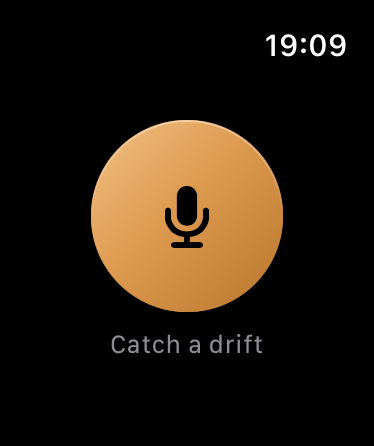
Catch a drift
The whole app. There is nothing else on the screen because there is nothing else to do.
What you can do
Tap once and talk
The whole app is one button. No list to scroll, no menu, nothing to read first.
Record without your phone
It records on the Watch itself, so a run or a walk with the phone at home still catches the idea.
Keep talking
It keeps recording while your wrist drops, which is what happens the moment you start thinking rather than posing.
Let it arrive on its own. When the Watch reaches your phone the capture goes through the same sorting as everything else, titled and pointed at an area.
Find it already filed. By the time you sit down it is in the inbox with everything else, not in a separate place to go and collect.
How it works
01
Raise your wrist
Open Drift on the Watch. There is one button on the screen and it is the one you want.
02
Say the thing
Talk as long as you need. The recording runs on the Watch, so signal and your phone are somebody else’s problem.
03
Forget about it
It syncs across by itself, gets written down, titled and filed, and is waiting in the inbox when you next look.
Why it works this way

One button is the feature

A watch is not a small phone. You have one hand, two seconds and no attention, so anything that asks you to choose has already failed. Drift on the Watch does exactly one thing, which is the only honest thing to put on a wrist.

The gap it closes

Running, cooking, driving, carrying a child. These are the moments ideas actually arrive, and they are exactly the moments a phone is unreachable. This is the difference between a system that catches most of them and one that catches all of them.

Common questions
Do I need my phone with me?
No. It records on the Watch and syncs when the two are next together.
Is it a separate app to install?
No, it comes with Drift. Install Drift on iPhone and it appears on the paired Watch.
Does it cost extra?
No. It is on the free plan like the rest of capture.
Pairs with
Try it with your own ideas
Free to start, no credit card. Set up your areas in two minutes.