DRIFT
← All features
Teleprompter

Read it straight to camera

Memorizing kills energy; winging it kills structure. The built-in teleprompter ends the trade-off: write in Drift, prop the phone by the lens, and read, at your own pace, or with voice follow, where the script listens and scrolls as you speak.

Plan
Free · voice follow on Pro
Works on
iPhone, iPad, Mac, browser
Find it in
From any script, or Tools in the sidebar
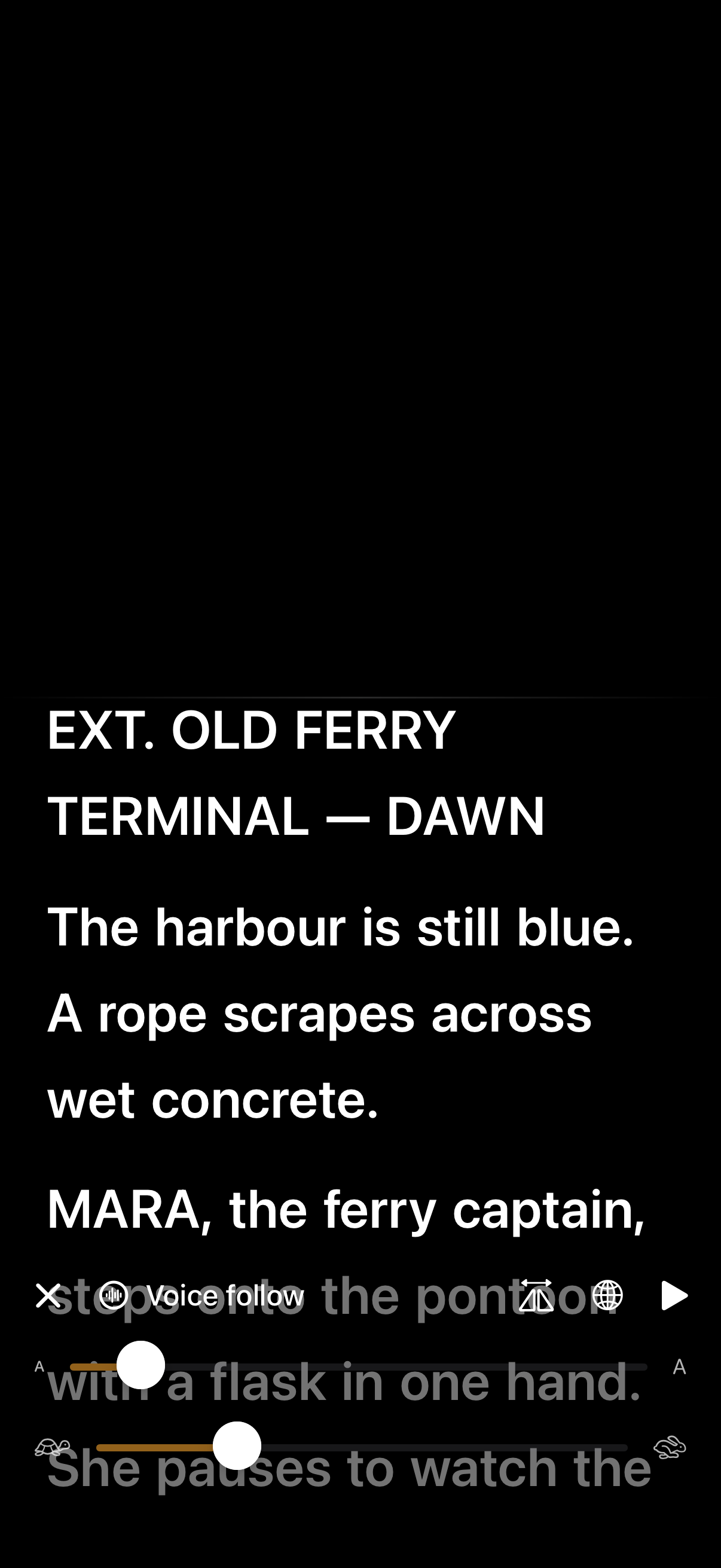
Everyone shows you the laptop on the beach. Nobody shows you March. So here is the honest version of going freelance, the one nobody films. The freedom is real, and so is the month nobody pays you. So is the Sunday you work because Tuesday went nowhere. I have done this for eight years and I would not go back, but I would have liked somebody to tell me the rest of it before I started. So that is what this is.
The controls from the real teleprompter. It runs full screen from your own script, and voice follow is Pro.
What you can do
Let it follow your voice
The prompter listens as you read and scrolls to match. Hands free, at whatever pace you actually talk.
Open it from the script
The prompter reads the same words you just wrote. No exporting, no second app, no reformatting.
Or drive it yourself
A speed slider and a pause, for when you would rather set the pace than be followed.
Wander and come back. Slow down for emphasis, riff for a beat, return to the line. It waits for you.
Keep your eyes near the lens. Large centred text, and a rotate button so the phone can lie whichever way your rig wants.
Read any script you have. Pick from anything written in Drift, not just the one you happen to have open.
Turn it for the rig. Rotate the text on the spot for a phone mounted sideways or reflected in a beam splitter.
How it works
01
Finish the script
Write in writing mode with your shots and voiceover notes inline.
02
Prop and read
Put the phone as close to the lens as you can and start talking, voice follow keeps the script under your eyes.
03
Deliver in beats
Slow down for emphasis, riff mid-take, come back. The script follows you, not the other way round.
Why it works this way

Voice follow, the point of it all

The prompter listens as you read and scrolls to match your pace. Slow down for emphasis, go off-script for a beat, come back, it waits for you. Manual speed is the fallback, not the ceiling. No other pocket prompter does this.

Why built-in beats a prompter app

Prompter apps mean exporting, reformatting, and losing your edits. Here the prompter reads the same script you just wrote, change a line, and it’s changed on the prompter.

Made for solo creators

No operator, no rig. A phone, a lens, and your own words at your own pace.

Common questions
What if I go off script?
Voice follow waits. It tracks what you are saying against the script, so a detour just pauses the scroll, and picking the line back up starts it again.
What do I get without paying?
The prompter itself and manual scrolling with a speed slider. Voice follow is the Pro part.
Do I need a second phone or an operator?
No. One phone propped next to the lens, and your voice does the scrolling.
Pairs with
Try it with your own ideas
Free to start, no credit card. Set up your areas in two minutes.