DRIFT
← All features
Writing mode

A writer that stays out of the way

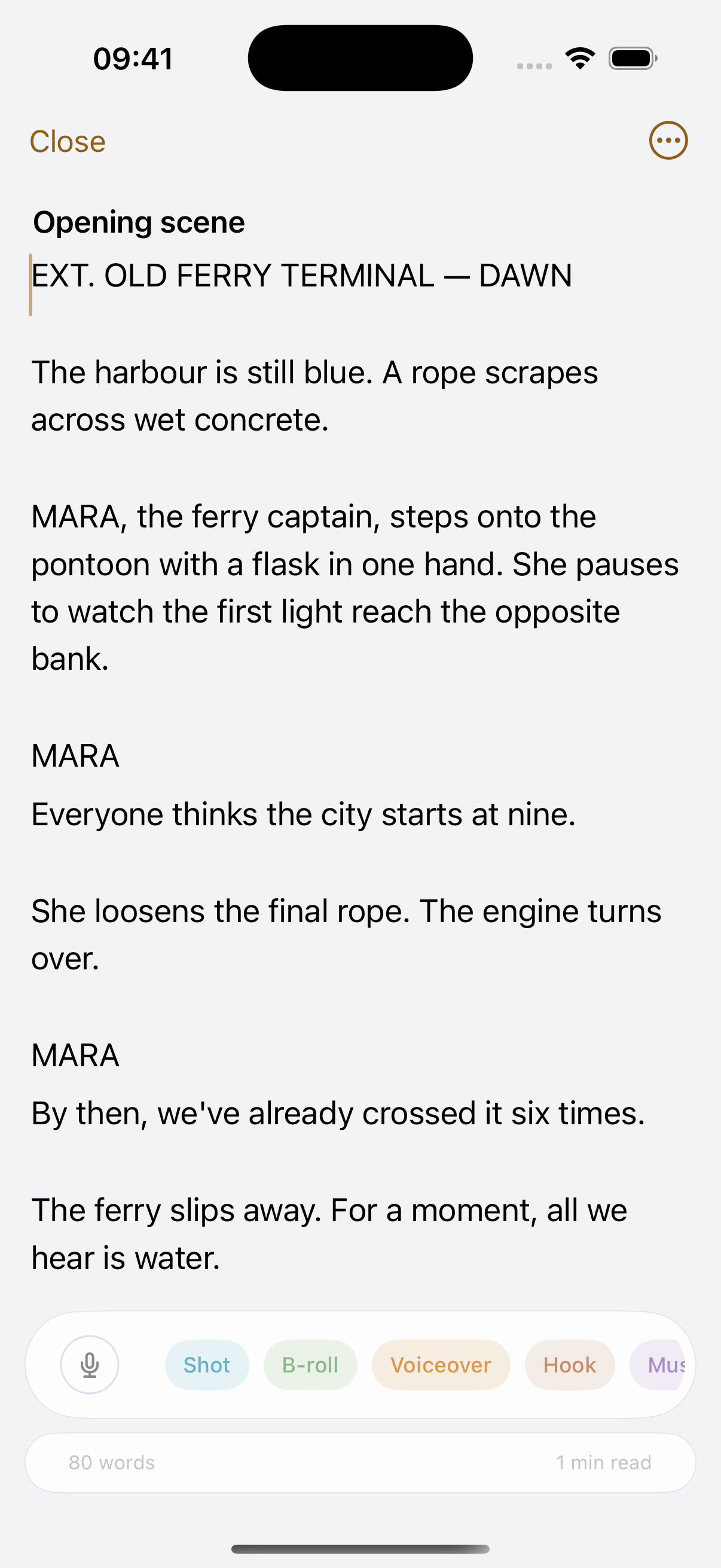
The distance between “idea” and “script” is where most videos die. Writing mode is a full-screen, zero-chrome editor built for talking-to-camera writing, with production notes living inside the script, and a toolbox that stays hidden until you reach for it.

Plan
Free · Structure cleanup on Pro
Works on
Best on Mac and iPad, works everywhere
Find it in
Open an idea, or Tools in the sidebar
## The honest ups and downs of freelance life
[HOOK] Everyone shows you the laptop on the beach. Nobody shows you March.
[SHOT] Desk at 7am, one lamp, the invoice open on the second screen.
Talk to camera. Do not make it sound like advice.
[VO] The freedom is real. So is the month nobody pays you, and the Sunday you work because Tuesday went nowhere.
Ask three freelancers for their worst year
ShotB-rollVoiceoverProduction noteMusic and sound
A working reference, not the whole editor. The real one is full screen, with focus mode, word suggestions, find and replace, voice mode, and the callout set you define yourself.
What you can do
Write on a blank page
Full screen, nothing on it but your words. The toolbox stays hidden until you reach for it.
Press “/” for structure
Checklists, headings and your own callouts without touching the mouse.
Keep the staging in the script
SHOT, B-ROLL, VO, production notes and music cues sit inline as coloured blocks, next to the sentence they belong to.
Pull the shot list out. One click extracts every callout as your shot list, or copies the clean spoken script on its own.
Dictate instead of typing. On-device speech, straight into the page. Talk, it types.
Never lose a draft. Version history, focus mode that dims everything but the current paragraph, find and replace, and Markdown out.
Invent your own callouts. Shot and voiceover if you film. Hook and offer if you sell. Guest and ad if you podcast. Define your own set once and it appears on every device.
Or start from your trade. Presets for filmmaking, marketing and podcasting, ready to edit rather than a blank page.
Dim everything but this line. Focus mode fades the rest of the document, and typewriter mode keeps the line you are writing in the middle of the screen.
Small mercies while you type. Word suggestions as you go, and find and replace when a name changes on you halfway through.
How it works
01
Open any idea and write
The captured thought is the start of your script. Writing mode takes it full-screen.
02
Structure with “/”
Slash commands insert checklists and callouts without touching the mouse. Production notes stay with the sentences they belong to.
03
Read it out
When the script is done, the teleprompter opens right from the writer. No exports, no copy-paste.
The ⋯ menu, for real
Callouts
The reverse: only your SHOT, B-ROLL, VO and note blocks. Your entire shot list, extracted in one click, this is the one that saves shoot days.
Voice dictation, talk, it types (on-device)/Slash commands, shots, VO, checklists, headings
This is the actual menu from writing mode, recreated. Click any row for what it does.
Why it works this way

Callouts are first-class

A script for camera isn’t prose, it’s words plus staging. Shot ideas, B-roll, voiceover, production notes and music cues each get their own colored block inline, so the edit is planned while the words are written. And when it’s time to shoot, one click extracts every callout as your shot list.

Suggestions, not autopilot

Drift can offer the next word or phrase as a quiet ghost. Tap to accept, keep typing to ignore. One tap on Structure and the whole script gets a grammar-and-flow cleanup that keeps your voice. Both optional, both yours to switch off.

Everything stays plain text underneath

The script round-trips cleanly, search it, share it, prompt it, copy it as Markdown or download the .md. No proprietary blocks holding your words hostage.

Common questions
What does Structure actually change?
Grammar, filler and flow. Not your voice and not your meaning. One tap undoes it, and a version is kept either way, so you can always read the two side by side.
Can I get my writing out of Drift?
Copy it as Markdown, download the .md, or copy just the spoken script without the callouts. It is plain text underneath.
Is it usable on a phone?
Yes, and it is better on iPad and Mac, where the writer gets a full page instead of a column.
Pairs with
Try it with your own ideas
Free to start, no credit card. Set up your areas in two minutes.